Opal FiveM
FiveM cheat · Windows 10/11 Intel/AMD
Your purchase is backed by years of development, continuous updates and a dedicated support team committed to your success.
Support is really helpful, and they assist very quickly if you have a problem with anything at all. I recommend it!
J Jan Morwa · VerifiedIt was very good, the service was good and all the cheats work.
R Rebecca Collins · VerifiedThe company is great, the support team is always nice and willing to take their time with you. Top tier.
E Elite830 · VerifiedThe installation is easy and the backup and help is a major part of why I stay.
C Crisso137 · VerifiedEverything included with Opal FiveM
Windows 10/11 Intel/AMD
Aimbot Options:
- Enable / Disable Key
- Show FOV Circle
- Field of View Radius
- Smoothing Slider
- Max Distance
- Hitbox Selection (Head / Chest / Arms / Legs / Custom)
- Smart Target Prioritization (Health, FOV, Proximity)
- Randomized Hitbox for Legit Look
- Delay Before Snap
- Interpolation Prediction
- Aim through Walls (Toggle)
- Ignore Downed / Invisible / In Vehicle / Friends
- Auto Lock-On Switch
- Softlock (Hold Aim Assist)
- Legitbot Mode (Simulates Skill)
- Trigger Pull Sensitivity
- Adaptive Aim Speed
- Visibility-Only Targeting
- Dynamic Smoothing Curve
Silent Aim / Magic Bullet Options:
- Enable / Disable Key
- Magic Bullet / Smart Bullet
- Bullet TP
- Rage Silent Toggle
- Field of View Ring for Silent Aim
- Ignore Invisible / Friends / Spectators
- Randomized Bullet Hitbox
- Bullet Curving AI (Homing)
- Auto Penetration Check
- Disable if Spectated
- Distance-Based Hit Chance
- Silent Knife / Melee Range
- Kill Through Walls / Telekill
- Bullet Visual Path
- Backtrack Support
- Lag Compensation Mode
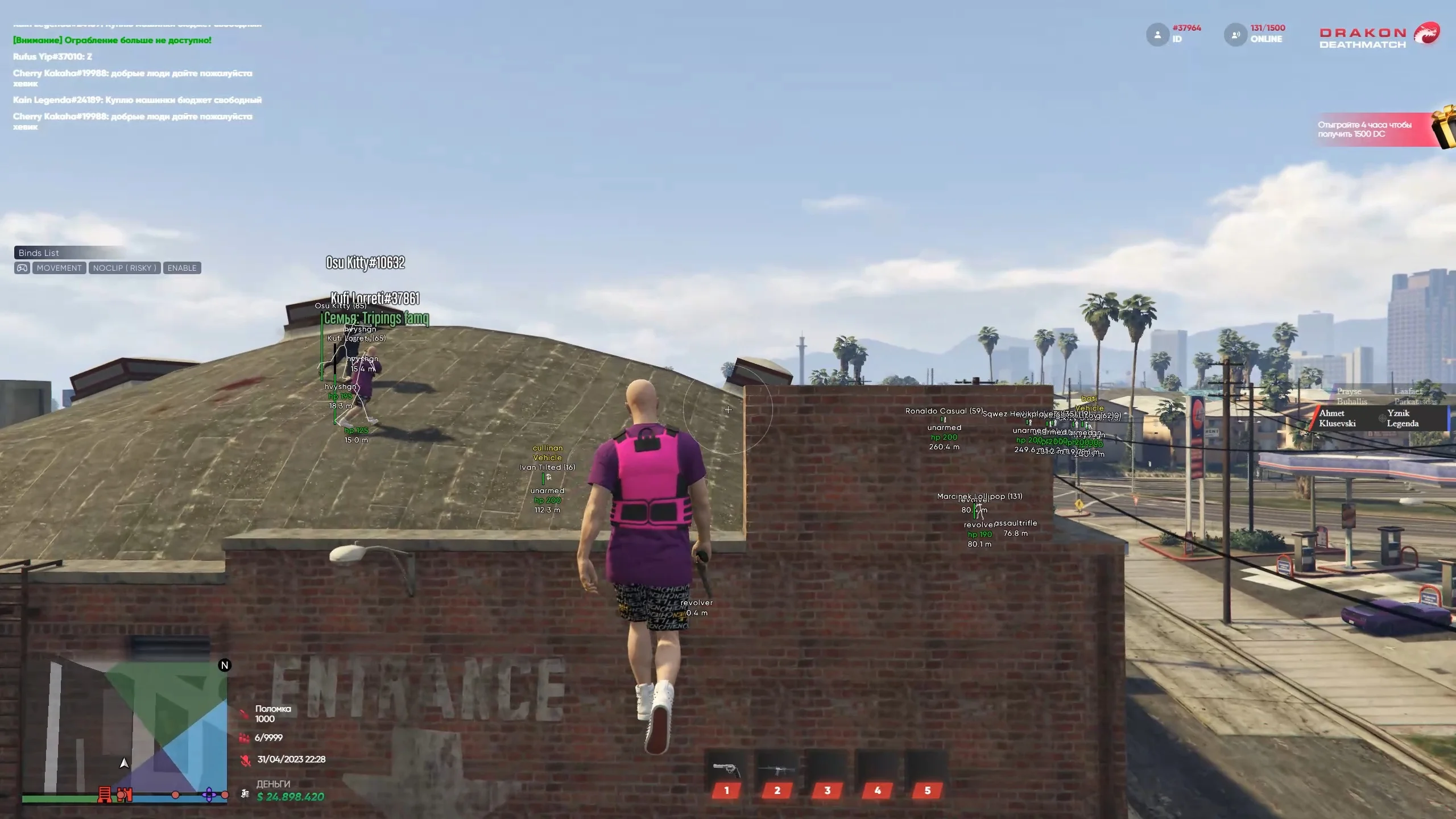
ESP / Visual Options:
- Container / Chest ESP
- Money / Cash Stack ESP
- Highlight Important Items (Priority Loot)
- ESP Clutter Filter
- ESP Range Adjuster
- ESP Animations (Fade In/Out)
- Skeleton / 3D Skeleton
- Box / Corner / Glow / Rounded Boxes
- Health / Armor / Status Bars
- Weapon / Ammo / Inventory ESP
- Player ID, Role, Distance, Status
- Loot Bag ESP
- Vehicle ESP (Locked / Health / Fuel)
- Visibility-Based Color Change
- Tracers (To Target or Screen Bottom)
- Directional Arrows (Offscreen Players)
- Spectator List
- Admin Alert (Mod Detection)
- Line of Sight Checker
- Sound ESP / Footprint Trail
- Player Ping (ESP Ping System)
- Bomb / Explosive ESP
- Equipment / Throwable ESP
- Camera / Drone ESP
Misc Options:
- Walk on Air
- Fly Hack (Toggle / Hold / Smooth)
- Slide / Peek Macros
- Climb Anything
- Stealth Mode (Low Sound, Low Visibility)
- Speed Modifier / Walk, Run, Sprint
- Random Outfit Generator
- Invisible Player
- Auto Revive on Death
- Clear Blood / Debuffs
- Always Clean Clothes
- Remove Body
- Anti-AFK System
- Rewind Position (Backtrack)
- Custom Player Scaling (Giant / Mini)
- Health / Armor Editor
- Super Jump / Super Punch / Long Jump
- No Ragdoll / Fall Damage / Knockback
- Desync / Lag Switch
- Noclip / Phase Walk
- Real-Time Outfit Switcher
Misc Options 2:
- Weapon Attachments Manager
- Zoom Level Editor (Scopes)
- Refire Delay Editor
- Bullet Magnetism (Legit AimAssist)
- Change Horn Sound
- Spawn Vehicle (Safe, Custom Color)
- Spawn Inside / Next To
- Bulletproof / Invincible Vehicle
- Attach to Other Vehicles
- Remote-Control Car
- Car Gun / Vehicle Dropper
- Horn Boost / Nitro Boost
- Jump Vehicle / Fly Mode
- Auto Repair / Auto Flip
- Lock / Unlock
- Delete / Explode / Hide
- Freeze Vehicle / Hover
- Seatbelt Toggle
- Drive On Water
- No Gravity / Hover Mod
- Attach Parachute
- Paint Randomizer
- Neon Underglow + Color Picker
- Tire Spike / Tire Lock
- Drive Up Walls
- Invisible Vehicle
Misc Options 3:
- Visual Jail (Invisible Walls)
- Flood Their HUD
- Force Emote / Dance
- Apply Random Effects
- Screenshot Spoof (Fake Inventory)
- Mark as Friend / Enemy
- View All Players / Status / Role
- Spectate Player (Bypass Restrictions)
- Kill / Explode / Freeze Player
- Cage Player / Trap in Objects
- Spawn Peds / Animals on Player
- Clone Player
- Jam Gun / Disable Controls
- Remove Vehicle
- Delete / Explode / Lock / Unlock
- Teleport Into / Onto
- Teleport Vehicle to You
- Flip, Freeze, Elevate Vehicle
- Paint All Vehicles Neon
- Vehicle Gravity Toggle
- Spawn Traffic Jam / Pile-Up
- Hijack Remote Vehicle
- Sync Damage to All Vehicles
- TP to Waypoint
- TP to Saved Position
- TP to Player / Vehicle / Loot
Misc Options 4:
- Random Safe TP
- TP to Sky / Under Map
- TP While Moving
- Auto-Teleport after Kill
- Delay TP (Escape TP)
- Save Current Location
- Crash All / Crash Selected Player
- Ragdoll Everyone
- Remove Map Objects (Specific Zones)
- Spawn Gas / Explosive Zones
- Kick All From Vehicle
- Force Disconnect Player
- Annoy Everyone Sound Loop
- Change Server Time
- Event Logger
- No Fog / Clear Skies
- Custom Time / Lock Time
- Custom Weather (Storm, Snow, etc.)
- Infinite Daylight / Perma Night
- Disable Environment (Rain, Dust, Fog)
- Infinite Ammo / Clip
- Explosive / Flame / Freeze Bullets
- No Recoil / No Spread
- One Tap Kill / Lethal Toggle
- Custom Reload Speed
- No Overheat (Energy Guns)
Misc Options 5:
- Fire Rate Modifier
- Smart Reload (Cancel Anim)
- Silent Fire
- Silent Reload
- Auto Triggerbot / Burst Mode
- Infinite Throwables
- Melee Damage Modifier
- Ammo Type Changer
- Disable All World Events
- Keybind Editor
- Input Blocker
- Config Save / Load / Autosave
- Menu Themes & Custom Colors
- Watermark Editor
- FPS Counter / Ping Display
- Animation Toggle for Menu
- Dynamic Menu Scaling
- Search Feature for Settings
- Unload
- Auto Parachute / Fall Catch
- Movement Randomizer (Anti Spectator)
- Weapon Spawner (Filtered)
- TP Player to You / Push Off Map
- Epic Surge (Spam Spawns)
- Spawn Fire / Smoke / Gas Zone
- Freeze Time
Opal FiveM questions
Is Opal FiveM undetected?
Yes. Opal FiveM is built to stay undetected and is retested after every FiveM update. If a patch breaks it, the product is pulled offline until a safe build is ready.
How fast is delivery?
Instant. Your license key and loader are shown right after payment and emailed to you at the same time.
Which plan should I choose?
Start with one week if you want to test it, choose one month for the best balance, and three months if you plan to keep playing. Longer plans cost less per day.
What do I need to run it?
Windows 10/11 Intel/AMD. Disable antivirus exclusions as described in the install guide and run the loader before launching the game.